loader image
Skip to main content
If you continue browsing this website, you agree to our policies:
  • Privacy Policy & Terms of Use for PAUL
Continue
x
  • Kategorien
    • All categories
    • General
    • Performing Arts and Film
    • Design
    • Fine Arts
    • Cultural Analysis
    • Music
    • Projects
    • Continuing Education
  • Home
  • Calendar
English ‎(en)‎
Deutsch ‎(de)‎ English ‎(en)‎
You are currently using guest access
Log in
Kategorien Collapse Expand
  • All categories
  • General
  • Performing Arts and Film
  • Design
  • Fine Arts
  • Cultural Analysis
  • Music
  • Projects
  • Continuing Education
Home Calendar
Expand all Collapse all
Course Menu
      Design

      Graphical User Interface II 2022

      Florian Wille Florian Wille
      Johannes Reck Johannes Reck
      Jürgen Späth Jürgen Späth
      Marcial (extern) Koch Marcial (extern) Koch
      View all
      • Design

        Graphical User Interface II 2022

        Florian Wille Florian Wille
        Johannes Reck Johannes Reck
        Jürgen Späth Jürgen Späth
        Marcial (extern) Koch Marcial (extern) Koch
        view all

        StuDAZ


        Show More Show Less
        • forum icon
          Announcements Forum
        • zoom icon
          Inputs/Mentorings/Presentations Zoom meeting
        • url icon
          Miro/Figma URL
        Show More
      • Course Setting

        In this area you will find all information about the general conditions of the course.


        • Lecturers
          • Prof. Jürgen Späth

          Teaching Assistant
          • Marcial Koch

          External Inputs
          • Florian Wille - Figma & Process of GUI Project @Dreipol
          • Renato Soldenhoff - Digitales Arbeiten an der ZHdK (DAZ)
          • Paolo del Ponte - Digitales Arbeiten an der ZHdK (DAZ)
          • Caroline Pieracci - UX Writing

        • Students

          Lukman Ascic, Lea Bischoff, Mo Bünzli, Sonja Cowley, Benjamin Eggstein, Carina Good, Loïc Hommel, Nanthatchaporn Pree Janthasom, Tanja Landolt, Giovanna Yanireth León Briceno (Exchange Student), Audrey-Meret Lohmann, Lyvia Muniz Gomes Wägli, Matthias Naegeli, Luis Praxmarer, Elena Walther, Lars Ziegler


          • Group 01
            Loïc, Elena, Tanja

          • Group 02
            Luis, Carina, Mo

          • Group 03
            Matthias, Lars, Sonja, Giovanna

          • Group 04
            Benjamin, Lea, Liv

          • Group 05
            Luke, Audrey, PJ

        • Tools
          • Teleconferencing Zoom
          • Online Collaboration Figma
          • Online Collaboration Miro

        • Attendance

          In the contact hours a minimum attendance of 80% is required to pass the course. Contact hours: kick-off, input session, mentoring, presentation. Two or more unexcused absences will affect the final grade. Arriving late on more than one occasion will also affect the grade.


        • Grading

          Grades will be based on final presentation, final work and deliverables.

          • 20% Final presentation
          • 50% Process and Outcomes (Concept, GUI, Micro Interactions, Prototype)
          • 30% Deliverables

        • Deliverables

          All deliverables have to be uploaded to the filer until Monday 13.06.2022 at 09:00 AM.

          • PDF Documentation (to be stored in a file labelled “Documentation”)
          • Mockup & screencast of interaction with the mockup. A short video (~2min) of the project (to be stored in a file labelled “Video”)
          • Text file including the project title, a short description, and a project description (in a file to be labeled “Texts”)
          • Approx. 10 representative images of the project (to be stored in a file labeled “Images”)
          • Click-Dummy

          Please take a look at the IAD documentation guidelines for submission.


        • Teaching Format

          The module involves a mixture of inputs, mentoring, atelier visits and independent work. The difference between the mentoring and the atelier visit lies in the level of expectation:

          Atelier Visit: Is like a shoulder view. Students show where they stand at the moment. They have the opportunity to ask questions that have arisen.

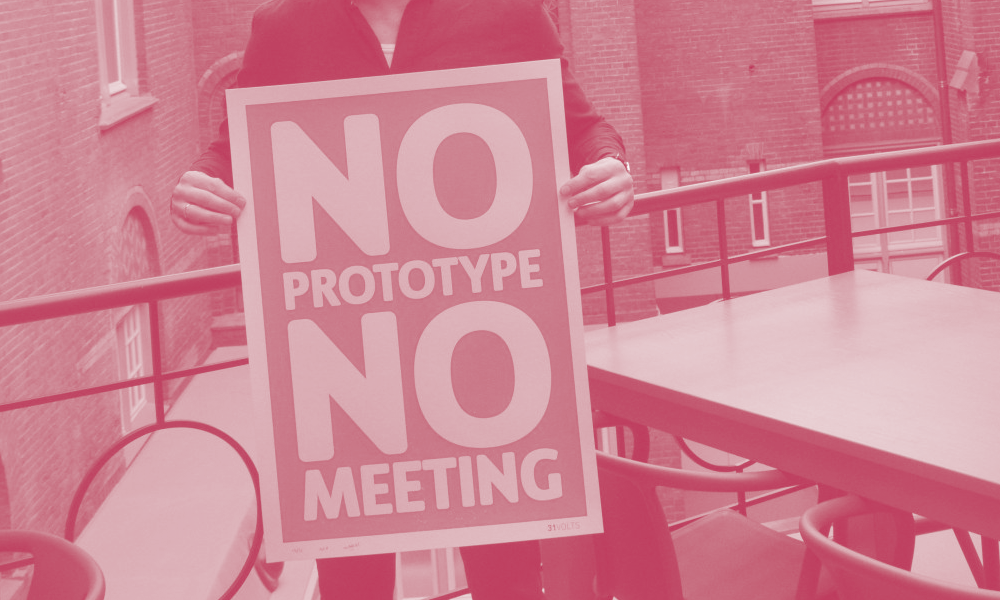
          Mentoring: There is an expectation of what the mentors want to see. This is specially prepared for the mentoring session, i.e. there are individual boards on which the relevant things to be shown and discussed are displayed. Motto: No Prototype. No Meeting.

      • Topic / Design Brief

        In this area you will find the briefing of the course and where we want to be at the end.

        • Overview & Objectives


          The main objective of the course is to gain practical experience in creating a graphical user interface (GUI). Therefore the students will apply their theoretical knowledge on design methods and processes to create an interactive prototype.

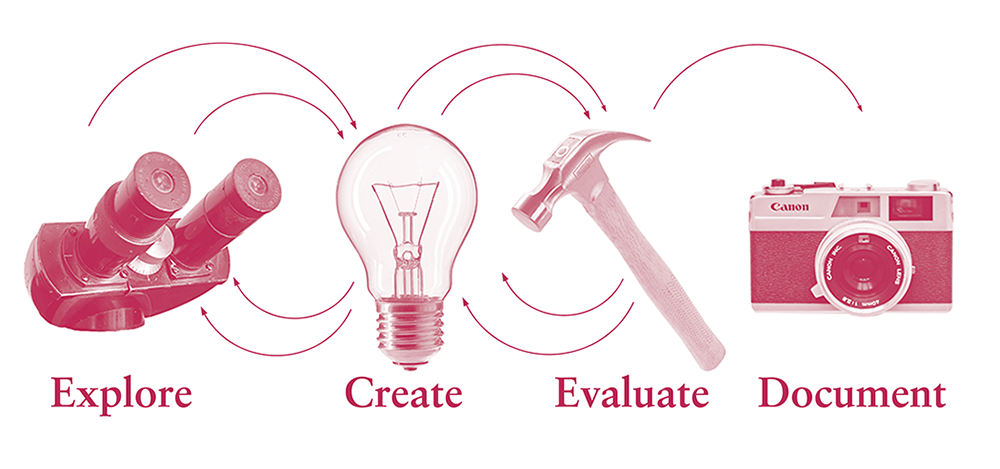
          Organised into groups, students will work their way through a four-part process.

          Exploration
          This process-part is the hard drive for all relevant information about our users, but also the general context in which our innovation development is embedded by analyzing the existing situation and similar works that have been done so far. Only when we have truly understood our users and their problems, we are able to develop an idea and later a product or service that will convince and excite them. 

          Creation
          In the creation phase we find ideas and solutions to our user's problems based on «How Might We questions», resulting in an understanding prototype and problem-solving hypothesis. 

          Evaluation
          Within the evaluation phase, we test the idea and prototypes on our users. We clarify the question whether the idea solves the user problem. 

          Documentation
          This is the part where all things flow together so that we can reflect and process what we have learned.


          During the course the student will learn:

          • how to analyse implemented graphical user interfaces in a comparable way,
          • how to design a graphical user interface in draft form and work it out as a simple prototype,
          • access a box of design methods for developing graphical user interfaces and use them appropriately.


        • Topic

          StuDAZ – Digital Transformation of Student-University organisation

          Data exchanges between student and University, as well as other administrative tasks are part of a students daily life. Within ZHdK most of this data points are spread over different platforms, making it difficult for the students to manage their studies. Do you know how to apply e.g. a vacation semester or exchange semester? Is it clear how to access your ECTS credits and understand what is already done or how many ECTS you still need in all the specific sectors? All this possible questions could be answered by deeply searching on different platforms, which leads to frustration and insecurity on students side.
          Furthermore, most of this processes are not digitalized, which means more administrative work on the part of students and the university.

          More than 2,000 students study at the ZHdK in over 20 different disciplines ranging from dance, music, and theater to design, art education, and fine arts. In addition, there are more than 400 employees who perform numerous tasks in teaching, administration and research.

          Students would enjoy to have an application for a clear organization of their study, whereby employees ask for a time-efficient student - University exchange. In this module we focus on an application that bundles all administrative processes and services that are required as a ZHdK student. All from the point of view of digitization. For this purpose, we are developing an interface for a smartphone application that students have all the important data in their pocket, accessible at every time. 

      • Calendar

        In this area you will find the google calendar with all the dates of the course.

      • Week 1 | 10.05. – 13.05.22

        Explore Module


        • Kick Off
          • Introduction into the module "Graphical User Interface"
          • Introduction to the basic tools
          • Super heroes & super villains
          • Team culture, team building
          • Briefing Day Downloads Briefing Day Downloads
            • GUI_FS22_Basic_Tools_Teamwork.pdf GUI_FS22_Basic_Tools_Teamwork.pdf
            • GUI_FS22_Explore_Module.pdf GUI_FS22_Explore_Module.pdf
            • GUI_FS22_Kick_Off.pdf GUI_FS22_Kick_Off.pdf
        • Corporate Design (CD) ZHdK


        • Qualitativ Interviews

          Ressources of the Explore Method «Interviews». What needs to be considered in order to produce useful material.

          • Qualitative Interviews Ressources Qualitative Interviews Ressources
            • GUI_FS22_Basic_Tools Interviews.pdf GUI_FS22_Basic_Tools Interviews.pdf
            • GUI_FS22_The_Qualitative_Interview.pdf GUI_FS22_The_Qualitative_Interview.pdf

        • External Input: Digital work at ZHdK (DAZ)

          Renato Soldenhoff and Paolo Del Ponte will give insights into DAZ.

          • Hochschuldaten Matomo Hochschuldaten Matomo
            • 20220518_Daten 2020.pdf 20220518_Daten 2020.pdf

        • Input: Design Method Personas

          • Input Personas Slides Input Personas Slides
            • GUI_FS22_Explore_Module Persona.pdf GUI_FS22_Explore_Module Persona.pdf

        • Download Session: Findings

          Each team has 15 minutes to tell the others about their findings out of the explore phase. The people listening add these points with post-its on their white boards (Miro). All post-its must then be clustered and help to create a User Journey Map.

      • Week 2 | 17.05. – 20.05.22

        Explore Module


        • Source: Digital Innovation Playbook


        • Input Wireframes

          A wireframe is a visual guide that represents the basic framework of a website. Wireframes are created to arrange elements to best serve a specific purpose.

          • Input Wireframes Slides Input Wireframes Slides
            • GUI_FS22_Evaluate_Module_Wireframes.pdf GUI_FS22_Evaluate_Module_Wireframes.pdf
        • Atomic design: how to design systems of components

          External Input: Florian Wille

          Room: Near Shift, 4.T06

          I will show you the basics of Figma - the current industry standard for designing GUIs.
          We will look at the basic functions, strategies on how to build a UI library that is easy to maintain and extend, and some tips&tricks.

          Prepare by:

          • creating a Figma account (preferably with your ZHdK address)
          • downloading the Figma App. 
          • Figma also runs in a Browser, so if you don't want to download the app have a current (chromium) browser installed.


          We will be working together in this Figma File


          Finally two articles on «Atomic Design» - a way of building a system of (nested) components:

          • Atomic design 2022: what we can learn from Eames and other design giants
          • Atomic design: how to design systems of components

          • Input Figma Input Figma
            • 20220518_GUI Tools Intro_Florian.pdf 20220518_GUI Tools Intro_Florian.pdf

        • Mentorings

          Have a look on the google calendar for your timeslot.

          We expect ideas from brainwriting and brainstorming translated into first sketches of wireframes.


        • Input Graphical User Interface
          • Input Graphical User Interface Slides Input Graphical User Interface Slides
            • GUI_FS22_Graphical_User_interface.pdf GUI_FS22_Graphical_User_interface.pdf
      • Week 3 | 24.05. – 27.05.22

        Create Module


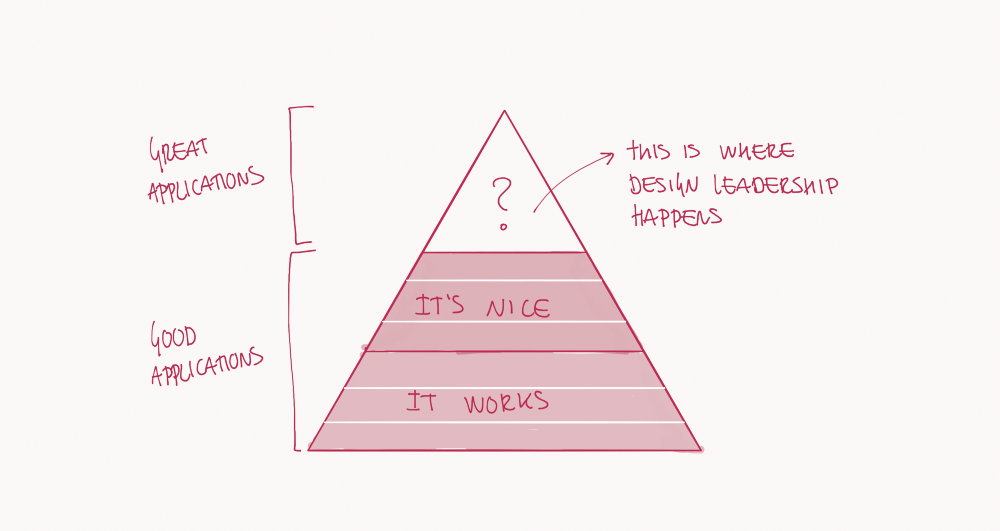
        • https://uxmag.com/articles/what-is-at-the-top-of-the-ux-pyramid


        • Mentorings

          Have a look on the google calendar for your timeslot.

          We expect advanced wireframes and first mockups.


        • Task: Beurlaubung

          • Application for leave of absence Application for leave of absence
            • GUI_FS22_Application for leave of absence.pdf GUI_FS22_Application for leave of absence.pdf

        • External Input: Caroline Pieracci

          Caroline Pieracci will give insights into the field of UX writing.


        • Help Build-Up Diploma Exhibition

          Schedule below
          27 May 2022 in 4 slots: (its noted in the google calendar)

          • 09:00 - 11:00: Tanja, Luis, Lars, Lyvia
          • 11:00 - 13:00: Elena, Carina, Matthias, PJ
          • 13:00 - 15:00: Loic, Mo, Lea, Luke
          • 15:00 - 17:00: Sonja, Giovanna, Benjamin, Audrey-Meret
      • Week 4 | 31.05. – 03.06.22

        Evaluation Module


        • Mentorings

          Have a look on the google calendar for your timeslot.

          Expectation:

          - continue working on your digital wireframes (Figma) 

          - focus on one concept in the team

          - three different skins for the main screen


        • Mid Presentations

          Each group presents 10 minutes. This is followed by a maximum of 10 minutes of discussion per project. Make sure that not only one person from the group presents, but that everyone in the team talks for the same amount of time.

          We recommend to work with slides. Of course, if you find a better way to present your project, you are free to do so.

          Expectation:

          - creates a presentation in e.g. keynote

          - briefly outline the most important points of the process in order to be able to understand the decision

          - The main focus of the presentation is the conception of the Figma wireframe

          - Implement leave semester request in wireframe

          - The further processed skin designs 


        • Mentorings

          Have a look on the google calendar for your timeslot.

          We expect advanced mockups incl. designskins, partly clickable.

      • Week 5 | 07.06. – 10.06.22

        Documentation Module


        • Mentorings on request

          Write us an email to juergen.spaeth@zhdk.ch & marcial.koch@zhdk.ch 1 day in advance.


        • Final Presentations

          Each group presents 15 minutes. This is followed by a maximum of 15 minutes of discussion per project. Make sure that not only one person from the group presents, but that everyone in the team talks for the same amount of time.

          We recommend to work with slides. Of course, if you find a better way to present your project, you are free to do so.


        • Feedback Session

          Each group gets a 30 minutes timeslot for mentor feedback to their project.


        • Deliverables on filer

          Upload the following deliverables on the server until 13.06.22, 09:00.

          • PDF Documentation  (to be stored in a file labelled “Documentation”)
          • Mockup & screencast of interaction with the mockup. A short video (~2min) of the project (to be stored in a file labelled “Video”)
          • Text file including the project title, a short description, and a project description (in a file to be labeled “Texts”)
          • Approx. 10 representative images of the project (to be stored in a file labeled “Images”)
          • Click-Dummy


      • Course Evaluation
        Highlighted

        In this area you have the opportunity to give feedback on the entire course. Feedback is very welcome to improve the course.


        • page icon
          Feedback for Course GUI 22 Page
      • Related Topic / Ressources

        In this area you will find interesting material that we have collected for the course.


        • Helpful Links
          Design Tools overview

          • Design Valley - Tool finder

          Articles for inspiration

          • Top 10 Mobile App UI/UX Design Trends for 2022
          • Microinteractions in User Experience: The What, Why, and How
          • 9 außergewöhnliche App-Design-Trends 2022

          Design Methods overview

          • UX Methods - Nielsen Norman Group
          • Digital Innovation Playbook
          • IBM Garage Methodology
          • IDEO Design Kit
          • Service Design Tools
          • Design Methods finder
          • ZHdK CAS Design Methods

          User Interface Design
          • User Interface Design Guidelines
          • 10 Usability Heuristics for User Interface Design
          • The 4 Golden Rules of UI Design

          Design Systems

          • Design Systems, A practical guide to creating design languages for digital products by Alla Kholmatova (book)
          • Material Design

          Visual Interface Design

          • Understanding Layout
          • 8dp Grid 
          • Baseline Grid – The basics of Baseline Grids in UI & Web Design by Jesse Showalter
          • The Colour System
          • Colour Tool
          • Understanding typography
          • Shape
          • Understanding Motion
          • 10 Rules of Thumb in UI Design
          • Mood Board
          • Skeumorphism
          • Flat Design
          • Neumorphism

          Literature Downloads
          • Download Ressources Download Ressources
            • Creativity Methods Creativity Methods
              • GUI_FS21_Brainstorming.pdf GUI_FS21_Brainstorming.pdf
              • GUI_FS21_Brainwriting.pdf GUI_FS21_Brainwriting.pdf
              • GUI_FS21_Create_Module_Collective_Notebook.pdf GUI_FS21_Create_Module_Collective_Notebook.pdf
              • GUI_FS21_Idea_Tower.pdf GUI_FS21_Idea_Tower.pdf
              • GUI_FS21_Jobs_to_be_done.pdf GUI_FS21_Jobs_to_be_done.pdf
              • GUI_FS21_Kill_Your_Company.pdf GUI_FS21_Kill_Your_Company.pdf
            • Explore Methode Explore Methode
              • Fly_on_the_Wall.pdf Fly_on_the_Wall.pdf
              • Mind_Mapping.pdf Mind_Mapping.pdf
              • Personas.pdf Personas.pdf
              • Stakeholder_Map.pdf Stakeholder_Map.pdf
              • User_Journey_Map.pdf User_Journey_Map.pdf
            • Interviews Interviews
              • Interviews.pdf Interviews.pdf
              • TALKING_TO_HUMANS.pdf TALKING_TO_HUMANS.pdf
            • Testing Testing
              • TESTING_WITH_HUMANS.pdf TESTING_WITH_HUMANS.pdf
            • UI Design Literature UI Design Literature
              • Alla Kohlmatova-Design_Systems.pdf Alla Kohlmatova-Design_Systems.pdf
              • Jenifer Tidwell-Designing_Interfaces.pdf Jenifer Tidwell-Designing_Interfaces.pdf
              • Jesse James Garrett-The_Elements_of_User_Experience.pdf Jesse James Garrett-The_Elements_of_User_Experience.pdf

        • Prototyping Tools

          Name

          Price Edu Price System
          ⭐️ Figma  Free, 12$/m Free for ZHdK Mailadress          Mac / Windows          
          ⭐️ Sketch  trial 30d, 9$/m 50% Mac
          ⭐️ Principle  trial 14d, 129$/y - Mac
          ⭐️ ProtoPie  trial 30d, 13$/m Free Mac / Windows
          ⭐️ Origami  Free Free Mac
          ⭐️ Adobe XD  Creative Cloud Creative Cloud Mac / Windows
          Balsamiq  trail 30d, 9$/m Free classroom use Mac / Windows
          Marvel  Free / 16$/m 70% Mac / Windows
          Invision  Free Free Mac / Windows
          Flinto  99$/y 50% Mac
          Framer
           Free / 25chf/m - Mac / Windows
          proto.io  trial 15d, 29$/m 50% Mac / Windows
          Axure  25$/m Free Mac / Windows
          Fluid  8.25$/m 90% Mac / Windows
          HotGloo  trial 7d, 13$/m 50% Mac / Windows
          Hype  100$ 70$ Mac
          JustInMind              Free Wireframe, 29$/m         - Mac / Windows
          UXPin  24$/m Free Mac / Windows
          Avocado  Free Free Mac / Windows
          Moqups  19$/m  - Mac / Windows
          Antetype  ?  ? Mac

        • Design Guidelines

          • Design Guidelines Google
          • Design Guidelines IBM
          • Design Guidelines Apple

          Tools overview
          • Design Valley
          • Prototypr

          UI Frameworks
          • Angular Material
          • React


          Prototyping Tools Tutorials
          • Figma
          • Protopie
          • Origami
          • AdobeXD


          Icons
          • Evericons
          • TheNounProject
          • Google Material Icons


          Colors
          • Palette List
          • HTML Color Codes

      Contact site support
      You are currently using guest access (Log in)
      Policies
      Get the mobile app
      Powered by Moodle


      2024, Zurich University of the Arts


      Privacy Policy & Terms of Use


      Legal Notice & Support


      Privacy Policy Terms & Conditions

      Urheberrechtsinhalte